The Loopler on Steam Deck
Verified handheld play: default controller config, in-game icons, legible text, and a loop you never have to steer.
The Loopler is Steam Deck Verified. That badge is Valve’s, not a wiki guess. The September 11, 2026 Steam 1.0 build (app 4150860) is the same single-player roster as desktop: nine cars, nine tracks, five difficulties, fifty cards, thirty gates, seventy charms, and 47 achievements. This page is the handheld article. For the PC, Mac, and Linux spec table, stay on system requirements. For what the meters mean once the car is looping, use How to Play.
You never steer. That is why Deck play is a shop problem, not a racing problem. Face buttons, trackpads, and the touch screen all draft packs, plant gates, Inspect Track, and Exit Pitstop. Analog corners do not exist. If you came here hoping for a steering overlay, you are in the wrong toy.
What Steam Deck Verified actually checked
Valve’s Verified report for The Loopler is the short list that matters on a commute:
- Default controller config. The official layout reaches every menu. You do not need a community profile to buy a gate or cancel a misplant.
- In-game controller icons. Prompts match a pad, not a leftover mouse cursor from the jam era. DualShock and DualSense both map; the Deck’s own buttons are the expected path in handheld.
- Text is legible. Pit-stop rows, tooltips, and the HUD chips (Ghost, Fuel-Refuel, Upgrade, Score) stay readable at Deck scale. If a meter still confuses you, that is a glossary problem, not a resolution problem — How to Play names the chips.
- Default graphics perform well. There is no ultra preset to chase. Steam’s Graphics line on desktop is the word no. The loop is a 2D slot-car board. Verified means the default Deck clocks keep that board smooth without a settings ritual.
- Mouse-only option and touch-only option. Both exist because the verbs are clicks. A Deck in desktop mode with a mouse, or a finger on the screen, can finish a 12-round contract without a pad.
- Playable without timed input. There is no QTE, no perfect-shift window, no yellow-light reaction test. Fail states are empty fuel and broken durability. Speed-up buttons are optional; they do not make the game a timing exam.
Install size is the same 500 MB posted on Windows, macOS, and Linux. Steam Cloud is on, so a garage you rolled on a desktop is the garage you open on the Deck. Family Sharing follows Valve’s usual borrower rules. Demo progress from app 4154070 does not Cloud into the paid app; start a fresh garage if you are coming from Next Fest hours.
Docked play is the same game on a bigger screen. Handheld is the Verified case. Either way, the car still drives itself. Lowest-loops leaderboards and Infinity Mode after a 12-round contract work the same as they do at a desk. Goal values on round 1 often sit near 200. That number does not care which device you hold.
Controller, mouse, and touch — you never steer
Pick one input for a run. Mixing a trackpad hover with a touch tap is how people drop a boost gate onto the wrong pin.
Controller (default). Face buttons confirm. A stick or pad moves the pit-stop highlight. Inspect Track, cancel placement, skip pack, and Exit Pitstop are all on the default config. DualSense and DualShock work when you dock or plug them in; they still do not analog-steer a corner. You are selecting UI, not a racing line.
Mouse-only. The jam on itch advertised itself as a mouse game. Steam 1.0 kept that path. Deck desktop mode, a Bluetooth mouse, or a USB-C mouse can click the pack, click the slot, click Exit. This is the input if you hate pad cursors and you already learned the HUD on a PC.
Touch-only. The screen is a bigger hitbox for the same verbs. Pinch-zoom is not a steering trick because there is no steering. Use touch for shop rows when you do not want to wake the sticks. Gate placement still wants Inspect Track first; a fat finger on the wrong pin is still a wrong pin. Cancel exists for that. It landed in the February 2026 demo QOL patch and stayed.
Pause actually pauses the simulation in 1.0. Use it to read a tooltip on a rattling train. Do not treat pause as a gate cheese. The game remains playable without timed input whether you pause or not; the car waits in the pit until you spend gold, then it loops while you watch.
Speed-up, pause, and pit stops on a handheld
Speed-up buttons live in the HUD and go up to 4x. On Deck they are reachable through the default controller config and through touch. Stay on 1x until you can name why a gate fired. 2x is for a named engine on rounds 5–8. 4x is for a solved contract or a lowest-loops board you already understand. A first-hour walkthrough should not 4x. A speed build that already prints loops can.
You do not need speed-up to clear a round. Verified’s “playable without timed input” line is the honest one: the buttons exist so a solved loop does not take real-time forever on a battery. They are not a hidden skill check. If a daily challenge or a mean difficulty feels rude, that is the modifier, not the Deck.
Pit-stop discipline does not change because the screen is smaller. Card pack around 10 gold, gates at 15–20, charms at 10–30, reroll around 5 unless taxed, skip pack possibly 100. Inspect Track is free information. The synergy planner is a markdown checklist you can keep in a second window or a browser tab; it is not an overlay you install beside Steam. Name one engine — speed, ghost, or score — then buy fuel as support. A Deck commute is a bad time to mix three half-engines.
Performance notes that actually matter in the bag:
- Default graphics are the expected path. Do not hunt a community FSR profile for a 500 MB 2D loop.
- Battery life is a Steam Deck problem, not a Loopler problem. Cap TDP if you want a longer session; the car will not punish you for 30 FPS the way a 3D racer would.
- Text and controller icons already passed Verified. If a charm tooltip feels small, pause and read it. Do not raise a sharpness filter and call it a wiki setting.
- Soundtrack DLC (app 4632040) and Supporter Pack cosmetics (app 4630020) add their own footprints if you bought the Infinity Edition bundle. They are not required to play on Deck. Details: DLC and Soundtrack.
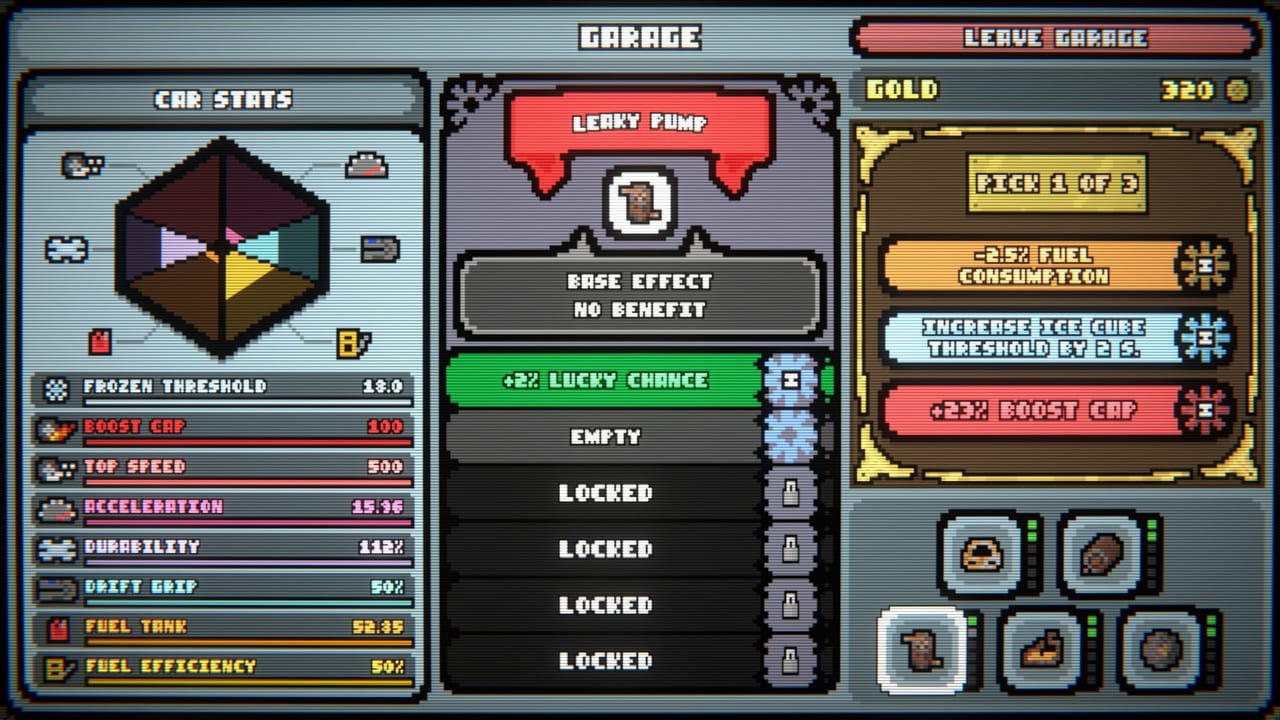
Layouts still change how many gates you can plant. Infinity, Hotdog, and Crown are the named circuits; the other six exist. Slot counts and Oil Leak events are the same on handheld as on desktop. See the tracks page. Cars still carry identities — yellow-style gold equal to durability/10 on round complete, blue-style extra starting durability — and the garage radar still rolls Fuel Tank and Fuel Efficiency. None of that needs a mouse.
A good Deck session looks like a good desk session with a smaller HUD: 1x until the sentence is planted, pad or touch but not both, pause for new events, 2x when the tank is honest. Then close the lid. Cloud will have the garage when you sit down.
Frequently Asked Questions
Quick answers to the most common questions.
Is The Loopler verified on Steam Deck?
Yes. Valve lists it as Deck Verified: default controller config, in-game controller icons, legible text, and default graphics that perform well. Specs sit on system requirements.
Do I steer the car on Deck?
No. You never steer, on any device. Controller, mouse-only, and touch-only all shop and plant gates. DualShock and DualSense map the same UI verbs.
How do speed-up buttons work on Steam Deck?
They sit in the HUD up to 4x and are reachable with the default pad config or touch. Stay on 1x until you can explain a gate. HUD details: How to Play.
Is there a reaction test on handheld?
No. Steam lists the game as playable without timed input. Fail states are empty fuel and broken durability, not a missed button.
Does Cloud work between a PC and a Deck?
Yes. Steam Cloud is on. Demo saves from app 4154070 do not carry into the paid 1.0 garage.