How to Play The Loopler
You never steer. Learn the meters, the pit-stop panel, and the buttons that actually change a loop.
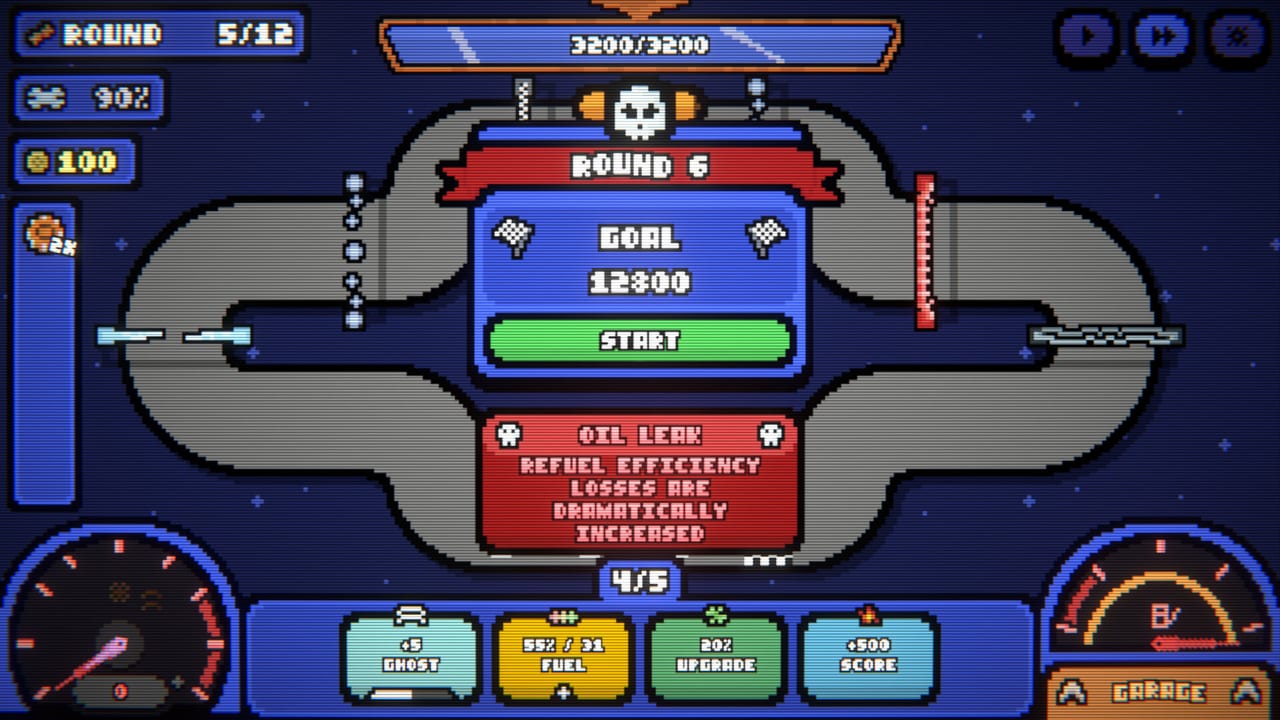
The Loopler is not a racer you drive. The car already knows the figure-eight. You click, you drag, you pause, you shop. This page is the control surface for the Steam 1.0 build that released on September 11, 2026: every meter, every pit-stop button, and how mouse, controller, and touch all map onto the same job. If you want a first-hour route instead of a glossary, start with Getting Started. If you already know what the bars mean, skip to the walkthrough.
The HUD, clockwise
Top-left durability is a percentage, not a heart counter. Empty it and the run is over. Durability drops when you stall out of fuel, when events punish you, and when the car simply cannot finish a contract. Gold sits near it. Gold never wins a round; it only buys the next pit stop.
The round chip reads values like 1/12 through 12/12. That is a standard track contract. Infinity Mode continues past the twelfth tick; the HUD still tells you which round you are on. Next to it, the score-versus-goal bar is the only win condition. Round 1 often asks for 200. By round 6 the same bar can already be five figures. Watch the fill rate, not the pretty car.
The speedometer is a liar in a useful way. 1.0 even changed its visual text to show stored speed instead of the capped needle, because late-run cars go so fast the sprite disappears. Trust the number, not the animation. The boost gauge next to it is how you get there. Boost gates and on-loop speed cards feed it. Empty boost with no refill plan is a slow death, not an instant one.
Bottom kit tiles are the live language of the run: Ghost, Fuel-Refuel, Upgrade, and Score. When Ghost ticks up you are stacking extra cars. When Refuel reads 15% you bought time. When Score reads +500 you committed to points. Those four chips should match one plan. If they argue with each other, the speed build, ghost build, and score build pages exist so you can pick a side.
A Garage button lives on this HUD. Open it between rounds or from the lobby. You are not placing parts mid-lap; you are checking Frozen Threshold, Boost Cap, Top Speed, Acceleration, Durability, Drift Grip, Fuel Tank, and Fuel Efficiency so the next purchase makes sense. Full part routing sits in Loadout and meta.
Inputs: mouse, controller, touch
Jam-era copy called this a mouse-only game. Steam 1.0 is not. Mouse, controller, and touch all work because you never steer. You select cards, drop gates onto marked slots, confirm shop rows, and hit speed-up. Steam Deck is Verified; the default controller config reaches every menu. DualSense and DualShock both map. Touch is the same verbs with bigger hitboxes.
During a lap you can pause. Pause actually pauses the simulation in 1.0 — demo patches had to fix a bug where the car kept looping behind the overlay. Use pause to read a tooltip, not to cheese a gate. Speed-up buttons live in the top-right and go up to 4x. Use 1x until you can name why a gate fired. 4x is for solved engines and lowest-loops boards, not for learning.
Gate placement is click-to-pick, click-to-slot. Each track has a fixed number of placement slots. Order is a combo: a boost gate first feeds every later trigger; a score gate first wastes the acceleration you have not built yet. 1.0 added an indicator for which gates you are placing and a cancel button so you can abort a bad drop. Inspect Track in the pit stop is the same idea without spending: look at the eight, count the slots, then buy.
The pit-stop panel
A typical pit stop is a shop, not a rest. Left to right you usually see a card pack around 10 gold, a flash-sale trinket, a row of gates at 15–20 gold, and charms at 10–30. Pins sit in a small tray. Reroll is cheap, often around 5 gold, until a charm like Trade Requisition multiplies that cost. Inspect Track is free information. Exit Pitstop is how you leave with money still in the pocket.
Skip pack can cost 100. That number is not a joke. Paying to refuse a dead pack is correct when the pack does not talk to your engine. Selling a card used to fail to update buyability; 1.0 fixed that. Duplicate non-stacking charms no longer spawn. Lucky gates double their value on upgrade. Coupon is multiplicative, not additive. Those are shop facts, not flavor.
You do not have to buy. Empty gold with a half-built engine is how demo players felt the shop was “the only thing that matters.” Mheep reworked gold income and first-round sameness for 1.0; treat that history as context, not as the current gospel. Current shop discipline is still: one matching gate, one pack if the engine is missing a trigger, charms that stack with what you own, then leave.
Overdrive can activate late when durability is gone and the car gets one last sprint. It is a fail-forward, not a plan. If you are relying on overdrive every round, the fuel or repair engine is already dead. Round rewards (gold, a durability bump, a pack) are chosen after the lap. The node map then asks whether you even get a pit this time.
Blue, orange, and skull lanes on the round-select map change risk, not controls. Event nodes such as Oil Leak smash refuel efficiency. You still use the same HUD; the meters just lie harder. Details of routing live in the walkthrough. Challenge variants live in Challenges.
JustDaZack’s embedded run is useful because it is a first-look: HUD reading, pack picks, and the moment you realize the finish line is not a gate. Numbers from demo footage can differ from 1.0 tooltips. When they disagree, trust the Steam build in your hands and the card tier list for current families (on-loop, on-drift, on-pass).
Play one 12-round track at 1x speed after this page. Name every meter out loud once. Then open a committed build or return to the Guides hub.
Frequently Asked Questions
Quick answers to the most common questions.
Do I steer the car in The Loopler?
No. The slot car loops on its own. Mouse, controller, and touch all draft cards, place gates, and shop. See Getting Started for the first-hour route.
What do the bottom kit tiles mean?
Where are the speed-up buttons?
Top-right, up to 4x. Stay on 1x until you can explain why a gate fired. Pause actually stops the simulation in 1.0.
How do I cancel a gate drop?
1.0 added a cancel-placement button and a highlight for the gate you are holding. Use Inspect Track in the pit stop before you spend. Slot order is ranked on the gate tier list.