The Loopler Tools
Wiki checklists for install specs and pit-stop routing — not downloadable cheats, trainers, or overlay apps.
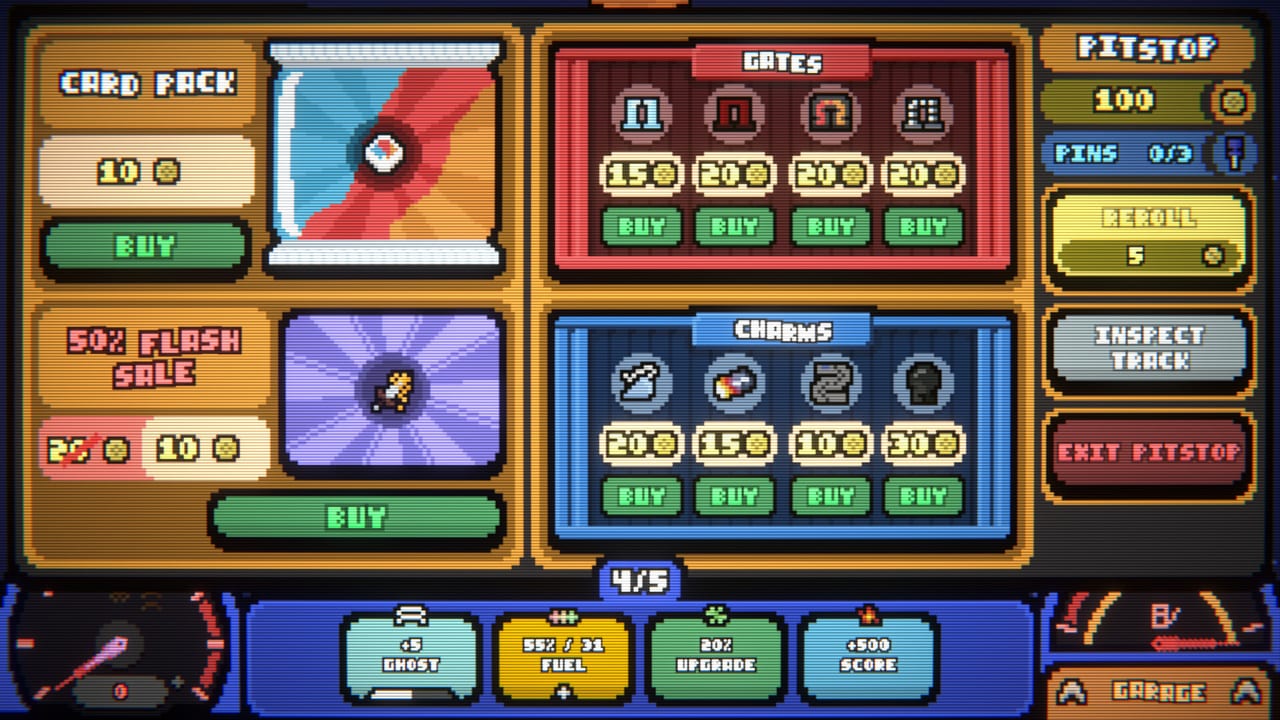
These pages are wiki tools for The Loopler, not software you install next to Steam. Nothing here injects gold, rerolls the shop, or reads memory. One page answers whether your machine will run the 500 MB build. Another is a pit-stop checklist you can keep beside the screen while the car loops. Deck play and the 47 Steam achievements get their own pages. If you wanted a trainer, you are in the wrong hub. If you wanted a shopping script you can follow with a mouse, start with the synergy planner.
The Loopler released on September 11, 2026 as a single-player Steam game from Mheep, published with Zero Percent. The car drives itself. Your decisions are draft, gate order, charms, and when to leave the shop. That is why a planner belongs here and a steering overlay does not.
What these wiki tools are
A tool page on this wiki is a structured article: tables, spend orders, skip lists. It is written against the 1.0 roster — nine tracks, nine cars, five difficulties, fifty cards, thirty gates, seventy charms — not against the Next Fest demo. Values still come from Steam tooltips; if a patch moves a number, trust the live card and then this page’s logic.
Four tools ship in this hub today:
- System Requirements — Windows, macOS, Linux, Steam Deck Verified notes, input options, accessibility, and install size.
- Steam Deck — Verified handheld play, controller icons, mouse and touch options, and how speed-up buttons work on Deck.
- Achievements — the 47 Steam badges, confirmed names only, grouped by First, Dura, Gold, Ghost, Tank, Overdrive, and the rest of the public list.
- Synergy Planner — pick a speed, ghost, or score engine, then walk a gate-order and charm-skip checklist at every pit stop.
They do not replace Getting Started or How to Play. Those tutorials teach the HUD. These tools assume you already know what gold, pins, and Inspect Track are, or that you can jump to those guides when a term is new.
System requirements, without the store-page fog
Steam lists The Loopler as a 2 GB RAM, 500 MB storage title with Graphics: no on Windows 10/11, macOS 11 Big Sur, and Ubuntu 20.04. It is Steam Deck Verified. Full controller support, a mouse-only option, and a touch-only option all exist because you never steer. The system requirements page unpacks that list: what “Graphics: no” actually means, which CPU lines Mheep posted, how Deck play feels, and why playable-without-timed-input matters more than a GPU SKU.
Read that page before you buy on a school laptop, a Mac mini, or a Deck that already holds three other deckbuilders. Then come back here only if the install finished and you need a shop plan.
Synergy planner, without a spreadsheet app
The planner is a markdown checklist, not a JavaScript calculator. You name one engine — speed, ghost, or score — then you follow gate order, charm skips, reroll rules, and pin usage. Mixing two half-engines is how demo players felt the shop was “the only thing that matters.” The planner exists to stop that mix at the door.
Use it with the ranking pages, not instead of them. After you know which family a card belongs to, open the card, gate, and charm lists. The planner tells you when to refuse a pack; the tiers tell you which pack was never going to talk to your gates. Loadout and meta is the garage layer that makes the same plan repeatable across runs.
How to use this hub with the rest of the wiki
- Confirm the machine on system requirements or Steam Deck, then play the opening rounds from Getting Started.
- Pick a car and track from the car and tracks lists. Name the engine before round 1.
- Keep the synergy planner next to the pit stop. Inspect Track, plant, cancel if the ghost preview is wrong.
- When a 12-round contract feels solved, move to How to Go Infinite and Challenges.
- For what 1.0 added on top of the demo, read Launch Notes. For Steam, Discord, and itch, use official links.
No page in this hub will download a helper, scrape a leaderboard, or promise an auto-reroll. The loop is the toy. The tool is the list you glance at while the car is already moving.
Frequently Asked Questions
Quick answers to the most common questions.
Are these The Loopler tools downloadable?
No. They are wiki pages: a spec sheet, a Deck article, an achievements list, and a pit-stop checklist. Nothing here installs beside Steam or changes the live run.
Which tool should I open first?
If you have not installed yet, system requirements. If the car is already looping, the synergy planner.